


How To Download The BitNasdaq App On Android
Feed-Creator-92c9d3ed6
Updated at: 6 months ago
How To Download The BitNasdaq App On Android
Follow these simple steps to download and install the BitNasdaq app on your Android device.
Step 01
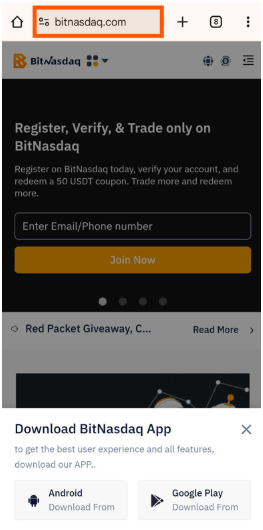
Open your mobile browser and enter www.bitnasdaq.com.
Step 02
You will see two download options:
Download from Play Store
Download Android APK

Step 03
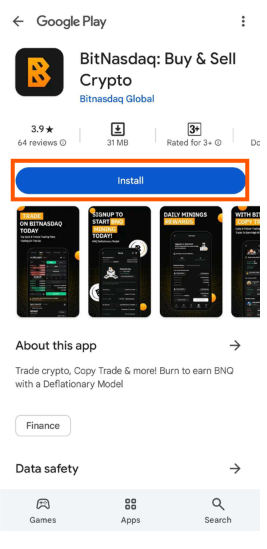
If you choose Download from Play Store, you will be redirected to the Play Store.
Tap Install to download and install the app automatically.
Step 04
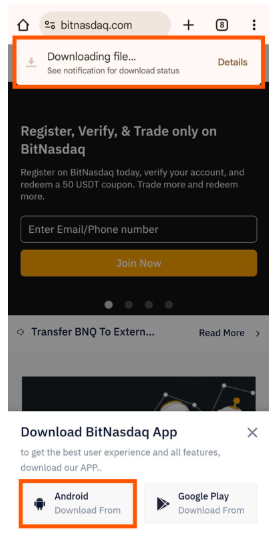
If you choose Download Android APK, the APK file will be downloaded to your device.
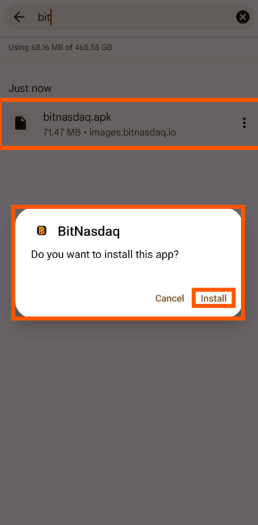
Open your downloads and tap the BitNasdaq APK file.
A prompt will appear, tap Install to complete the installation.
Once installed, open the BitNasdaq App and get started!