Your browser does not support the audio element.
bitnasdaq-logo
  • ···
  • Buy Crypto
  • ···
  • Futures
  • ···
  • Trade
  • ···
  • Market
  • ···
  • Mining
  • ···
  • Financial
  • ···
  • Spot & Margin
    • Spot
    • Margin
    • FAQs
  • Future
    • FAQs
    • User Guide
  • Financial
    • FAQs
    • User Guide
  • P2P
    • FAQs
    • User Guide
  • Convert
    • FAQs
    • User Guide
  • Security
    • FAQs
    • User Guide
  • Affiliate Program
    • FAQs
    • User Guide
  • General
    • User Guide
  • Reward Hub
    • User Guide
    • FAQs
  • Strategy Bot
    • FAQs
  • Referal Program
    • FAQs
  • VIP & My Fee
    • FAQs
  • BNQ
    • FAQs
    • User Guide
  • Copy Trade
  • BNQ Mining

Announcement

Help Center>General>User Guide>

How To Download The BitNasdaq App On Apple Devices

Garry Netherland jPHu

Updated at: 6 months ago

How To Download The BitNasdaq App On Apple Devices

Follow these steps to download and install the BitNasdaq app on your iPhone, iPad, or iOS Devices:

Step 01

Open your mobile browser and go to www.bitnasdaq.com.

1.png

Step 02

You will see two download options:

  1. Download TestFlight

  2. Download iOS Beta App

2.png

Step 03

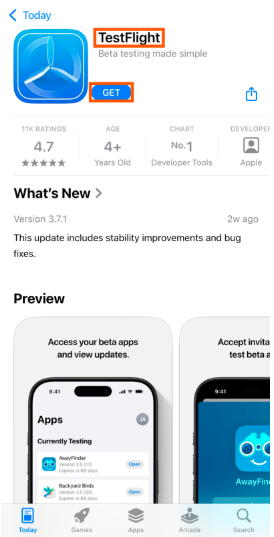
  1. First, tap Download TestFlight.

  2. You will be redirected to the App Store.

  3. Tap Get to install TestFlight.

3.png

Step 04

  1. Once TestFlight is installed, go back to your browser and tap Download iOS Beta App.

4.png


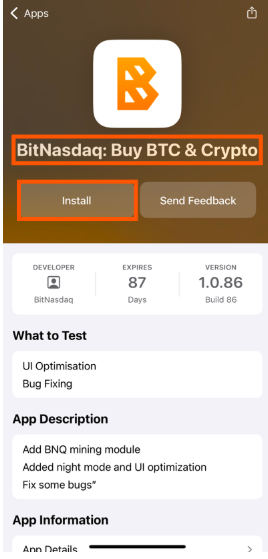
  1. You will be taken to the Beta App page.

  2. Tap Install to download and install BitNasdaq on your device.
5.png

Once installed, open the BitNasdaq App and get started!

Related Articles

  • How To Deposit USDT In BitNasdaq Via App
  • How To Deposit USDT Via P2P Trade On BitNasdaq?
  • How To Download The BitNasdaq App On Apple Devices
  • How To Download The BitNasdaq App On Android
  • How to Deposit USDT in BitNasdaq from Any Wallet
  • How to get your coin listed on the BitNasdaq cryptocurrency exchange
  • How to withdraw in fiat form exchange
  • How to modify your name on BitNasdaq